Sample
Use Register Sample from the left sidebar. Select the correct Study ID, enter the source and organism details, and upload the completed sample template.
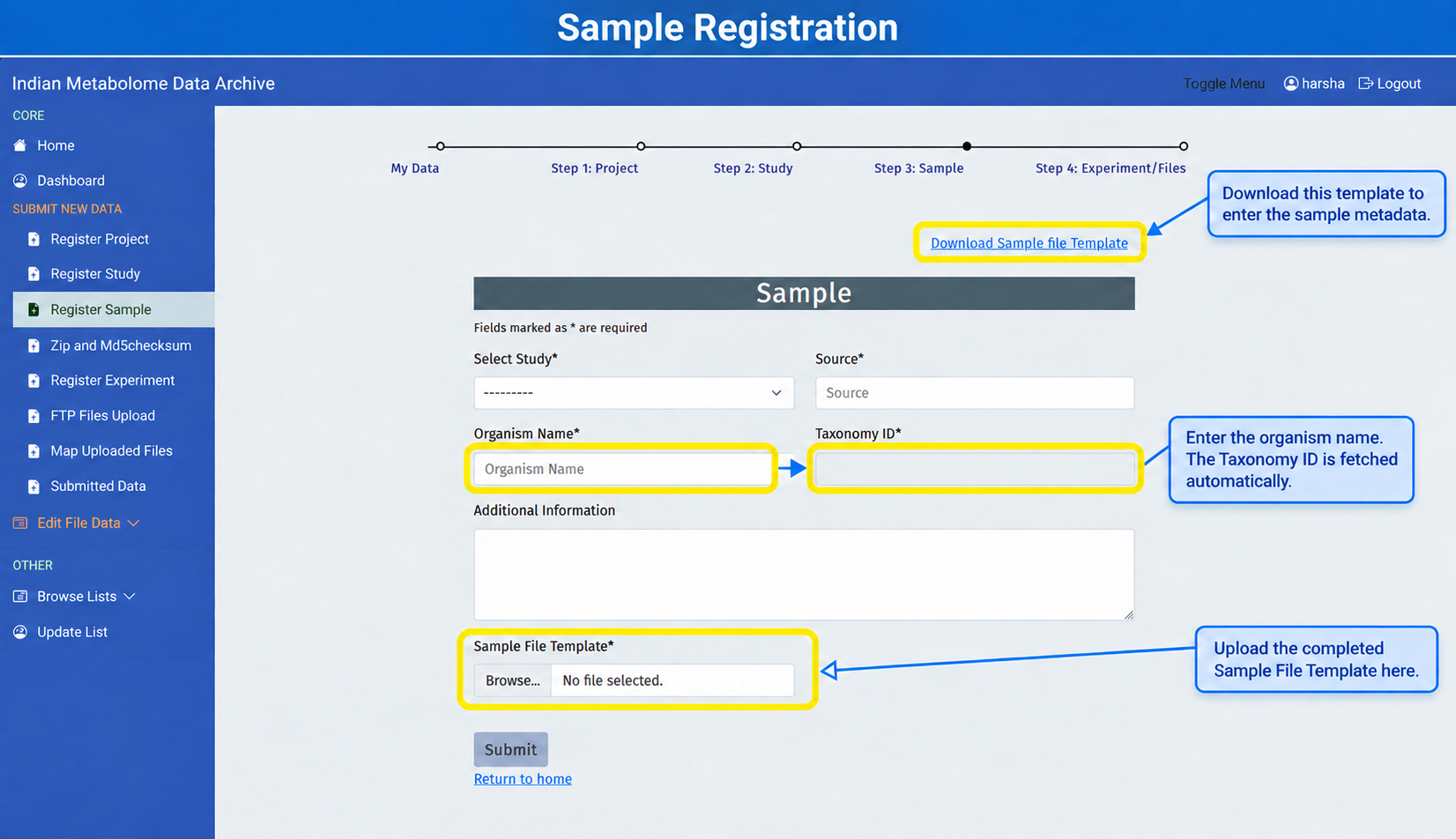
What to Fill
| Field | What to Enter | Writing Guideline |
|---|---|---|
| Select Study* | Study ID to which these samples belong. | Choose the correct study before uploading the template. |
| Source* | Biological material or source from which the sample came, such as tissue, cell line, biofluid, plant part, culture, or environmental source. | Select the closest available controlled term. Avoid local abbreviations. |
| Organism Name* | Scientific organism name. | Use binomial name, for example Homo sapiens or Oryza sativa. |
| Taxonomy ID* | NCBI taxonomy number fetched by the system. | Check that the number matches the organism name. |
| Additional Information | Relevant sample characteristics, such as organism part, cell type, disease or condition, treatment, collection site, control status, or quality-control status. | Use clear and consistent terms. Enter NA only when the information genuinely does not apply. |
| Sample File Template* | Completed sample Excel template. | Do not change column names in the template. |
Sample Template Columns
Download the Sample file template, fill one row for each sample, and upload the completed Excel file in Sample File Template. Do not rename, delete, or reorder its columns.
| Template Column | What the User Should Fill |
|---|---|
| Sample Name | Unique sample identifier used by the submitter. Use the same name later in the MS or NMR experiment template. |
| Sample Type | Role or material type, such as experimental sample, control, quality-control sample, standard, pooled sample, plasma, serum, tissue, extract, culture, or cell line, as appropriate. |
| Sample Preparation Protocol | Short description of how the sample was prepared before extraction or analysis. |
| Extraction Protocol | Solvent, method, or protocol used to extract metabolites from the sample. |
| Experimental Condition (Treated/Untreated, Healthy/Diseased, Others) | Study factor or condition that distinguishes groups, such as treated, untreated, control, diseased, healthy, exposed, dose group, or time point. Use the same terms for samples in the same group. |
| Time of treatment | Treatment duration or collection time point, such as 0 h, 24 h, 7 days, or NA if not applicable. |
| Variant/Variety | Strain, cultivar, variety, genotype, breed, or variant where applicable. Use NA if not applicable. |
| Gender | Male, female, pooled, mixed, not recorded, or NA depending on the sample type. |
| Age | Age of organism or subject, including unit where possible, such as 8 weeks, 45 days, adult, or NA. |
| Replicates | Replicate number or group, such as biological replicate 1, technical replicate 2, R1, R2, R3, or pooled. Keep biological and technical replicates distinguishable. |
| Storage Conditions | How the sample was stored before analysis, such as -80°C, liquid nitrogen, 4°C, room temperature, or NA. |
| Number of files per sample | Exact number of raw/processed data files that belong to that sample. This number should match the files uploaded later. |
After template submission, IMDA generates Sample IDs. Use these IDs in the experiment template to link each analytical measurement and data file to the correct sample.
Required Sample Context
Each sample should clearly connect to one study and one source. Check the study, sample name, organism name, taxonomy ID, and source before submitting.
Submit and Continue
- Download and complete the sample file template.
- Upload it using Choose File.
- Click Submit to register sample metadata.
- Open My Sample and keep the generated Sample IDs for the experiment template.
Quality Check
Confirm that sample names are unique, the selected Study ID is correct, the taxonomy ID matches the organism, and the number of files per sample is exact. Do not change template headers or use NA for information that is available.