Project
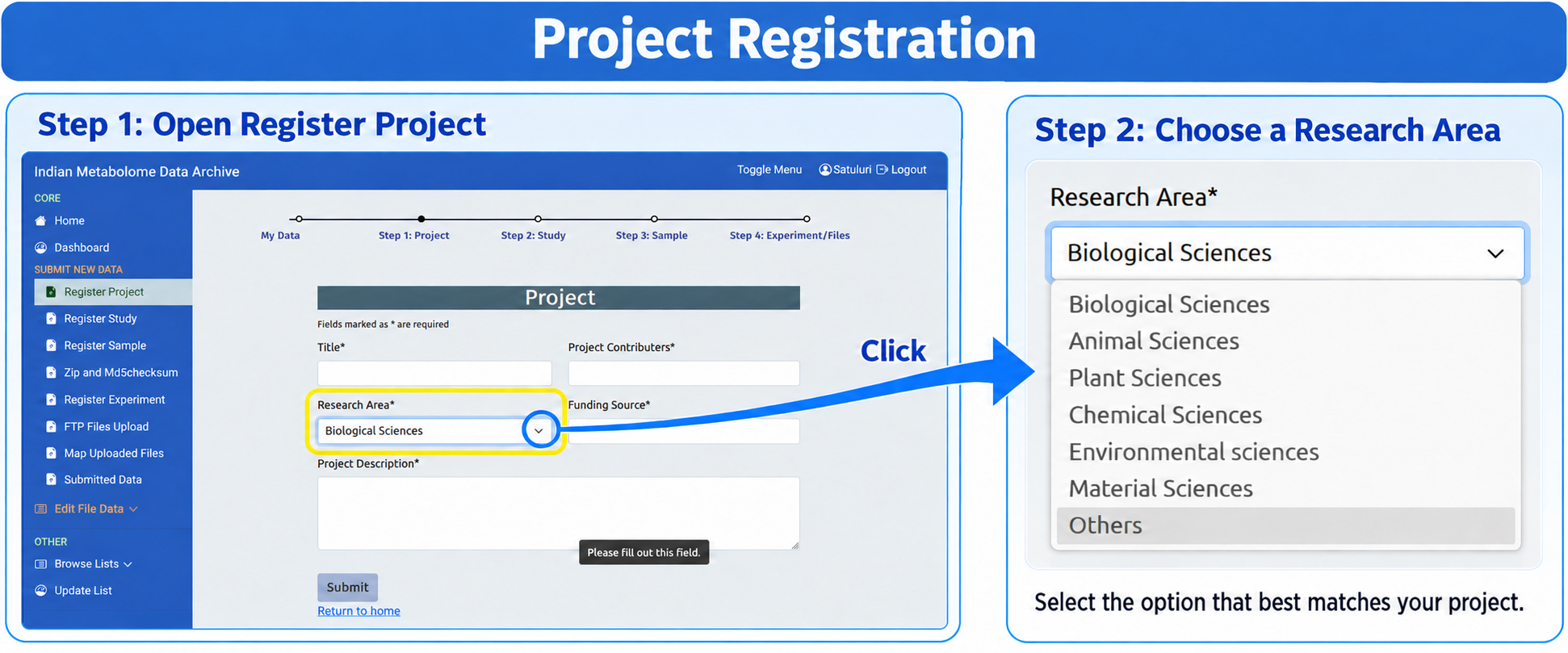
Use Register Project from the left sidebar. The project is the top-level IMDA record and must be created before a study can be registered.
Temporary Project ID
After submitting this form, IMDA will assign a temporary Project ID in the format TEMP_IMP_XX.
What to Fill
| Field | What to Enter | Writing Guideline |
|---|---|---|
| Title* | Official name of the overall research project. | Use a specific, descriptive title. Do not use only a disease, organism, or instrument name. |
| Project Contributors* | Principal Investigator, submitter, and other people responsible for the project. | Enter full names and use valid email addresses and complete institution names wherever requested. |
| Research Area* | Main scientific subject area of the project. | Select the closest available controlled term. If no suitable term exists, check Browse Lists or request an addition through Update List. |
| Funding Source* | Funding agency, grant number, or institutional support. | Use the official funder name and grant number. If there was no external funding, follow the option provided by IMDA. |
| Project Description* | Brief description of the project purpose, scope, and expected data. | Write 3-5 clear sentences that explain the research question and the type of metabolomics work. |
Submit and Continue
- Fill all fields marked with an asterisk.
- Select the closest Research Area.
- Check the funding source and project description carefully.
- Click Submit to register the project.
- Keep the temporary Project ID and select it when registering the study.