Before You Start
Use this checklist to prepare the metadata and data files required for an IMDA submission. Preparing these details in advance helps prevent missing information, incorrect file links, and repeated uploads.
Complete Submission Flow
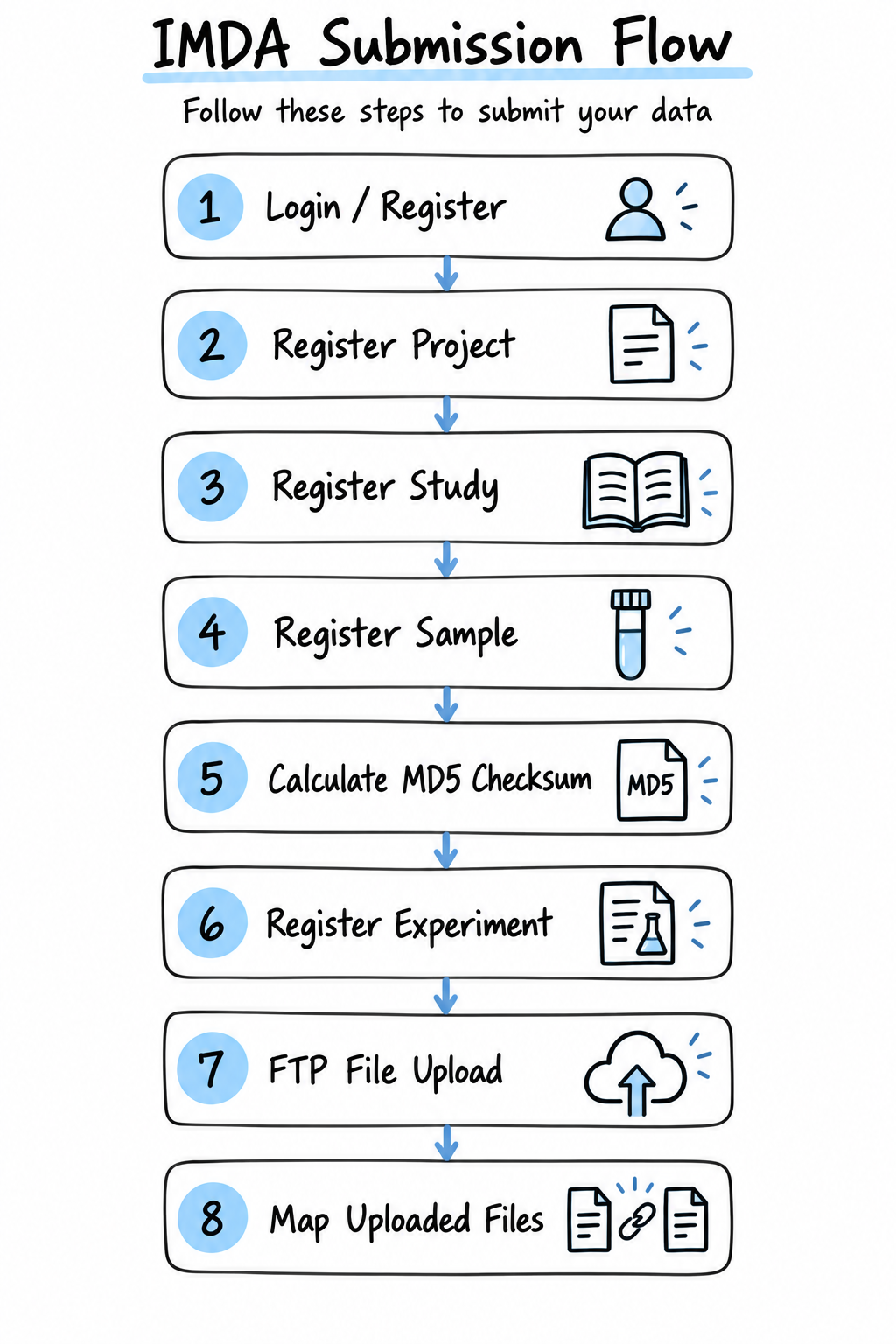
The flowchart gives a quick overview of the complete submission. Keep it on this page as a reference, then use the sections in the left navigation for detailed instructions.
Temporary and Permanent IDs
During the submission process, IMDA provides temporary identifiers:
- Project:
TEMP_IMP_XX - Study:
TEMP_IMS_XX
After the submission is completed, IMDA assigns permanent accession IDs:
- Project accession:
IMP_XXXXXX - Study accession:
IMS_XXXXXX
How IMDA Records Are Connected
IMDA records information in linked stages. Complete each stage before moving to the next one.
| IMDA Section | What It Describes | Record Link |
|---|---|---|
| Project | The overall research activity and its contributors, research area, funding, and purpose. | One project can contain multiple studies. |
| Study | A specific investigation or dataset within the project, including its title, design, summary, authors, and release information. | Every study belongs to one project. |
| Sample | The biological or other source material used in the study, including sample characteristics and experimental conditions. | Every sample belongs to one study. |
| Experiment | The analytical assay used to measure the samples, such as mass spectrometry (MS) or nuclear magnetic resonance (NMR). | Experiment rows connect Sample IDs to data files. |
| Data files | Raw or processed files produced by the instrument, together with their file names and MD5 checksums. | Every file must match an experiment-template row. |
Submission Checklist
Account and Contributor Details
- Keep the submitter's active email address, full name, organization, designation, country, and ORCID ready.
- Collect the full names, email addresses, affiliations, and roles of the Principal Investigator and contributing authors.
- Make sure the user profile identifies the person responsible for the submission.
Project and Study Description
- Prepare a clear project title, project description, research area, funding agency, and grant number where applicable.
- Prepare a descriptive study title, a short scientific summary, study type, data type, keywords, and release date.
- Keep publication identifiers and ethical or institutional approval numbers ready where applicable.
- Use consistent project, study, method, and author information throughout the submission.
Sample Metadata
- Prepare a unique name for every sample, including controls, standards, pooled samples, and quality-control samples where used.
- Record the sample source, scientific organism name, taxonomy ID, sample type, preparation and extraction methods, experimental condition, treatment time, replicate information, and storage conditions.
- Record the exact number of data files belonging to each sample.
- Download and complete the sample template in the Sample section. Do not change its column names or order.
Experiment and Data Files
- Decide whether the experiment uses MS or NMR and prepare the instrument, acquisition, and data-processing details.
- Keep the final raw data and processed/result files ready. Compress each complex raw-data folder into its own ZIP file.
- Use only letters, numbers, hyphens, underscores, and dots in file and folder names. Do not use spaces or special characters.
- Use open data formats where available, such as mzML for MS and nmrML for NMR.
- Install an FTP client such as FileZilla for data-file upload.
- Download the relevant MS or NMR template in the Experiment section after IMDA has generated the Sample IDs.
Keep Names and IDs Consistent
The same information is reused across several stages. A mismatch can prevent file mapping or validation.
| Information | Consistency Rule |
|---|---|
| Project ID | Select the correct project when registering the study. |
| Study ID | Use the same study when registering samples, experiments, and FTP files. |
| Sample ID | Copy the IMDA-generated Sample ID into the first column of the MS or NMR template. |
| Sample name | Use the same unique sample name in the sample and experiment templates. |
| Data-file name | Enter the exact final file name, including its extension, in the experiment template. |
| MD5 checksum | Generate it from the final file or ZIP and enter the matching value in the same experiment row. |
Use NA When Information Is Unavailable
Throughout the IMDA submission, enter NA in a metadata-template cell or free-text field when the requested information is genuinely not available or not applicable. Do not leave such cells blank. Do not use NA instead of an IMDA-generated ID, a required dropdown selection, a compulsory file, or mandatory account and contact information.
Before Moving Ahead
Complete Project, Study, and Sample registration before preparing the final experiment template. Finalize each data file and calculate its MD5 checksum before registering the experiment. Do not rename, edit, or recompress a file after calculating its checksum.